
[PR]上記の広告は3ヶ月以上新規記事投稿のないブログに表示されています。新しい記事を書く事で広告が消えます。
The Netgear Nighthawk M1 is a mobile LTE router designed to provide other devices fast Internet access. In addition, it offers some interesting features, which we will explain in the following article in more detail.

Nighthawk M1 Overview
If you also want to use the Internet on your notebook or tablet while traveling, you either need a device with a SIM card slot or use your smartphone as a hotspot, or you can get a mobile router like the Netgear Nighthawk M1. The small router uses the LTE network and is designed to allow mobile Internet access for devices without LTE modem.
Technical specifications
|
WLAN standard |
WLAN 802.11 b / g / n 2.4 GHz; WLAN 802.11 a / n / ac 5 GHz |
|
MIMO |
4 × 4 MIMO |
|
Frequency bands |
LTE CAT. 16, LTE Advanced 4-band CA. Up to 4X Carrier Aggregation LTE / 4G 700/800/900/1800/2100/2300/2500/2600 MHz 3G 850/900/1900/2100 MHz |
|
Chipset |
Qualcomm MDM9x50 |
|
Connections |
1x Ethernet, 1x USB Type A, 1x USB Type C |
|
Dimensions |
105.5 x 105.5 x 20.35 mm |
|
Weight |
240 g |
Package Content

Design & Features
The Netgear Nighthawk M1 measures 105.5 x 105.5 x 20.35 millimeters and is therefore small enough to go through as a mobile router. The case is made of plastic, with battery; the router brings a weight of 240 grams. On the top there is a circular screen that provides information about data usage, number of connected devices, connection status and battery level. The upper plastic frame contains the power button, which is also used to navigate through the various displays on the screen.
The ports are integrated into the lower part of the frame, including an Ethernet port and a USB Type A and Type C port. Both USB ports allow you to connect external media to share the files on the network of the Nighthawk M1. The Type C connector is also used to charge the battery, whereas the Type A connector can charge other mobile devices. The connectors are flanked by TS-9 connectors for optional 4G/3G antennas. When not in use, the connections are protected by a cover.
The back cover can be removed to expose the replaceable 5.040 mAh battery. Below the battery is the slot for a micro SIM card. The test also worked well with a Nano SIM card, as long as it is correctly positioned on the contact points. A microSD card slot is also included, which can be used, for example, to stream movies or other files through the Netgear Nighthawk M1.

The interior is simple and can be completed in a few minutes. In the first step, a device (notebook, smartphone, tablet) must connect to the Netgear Nighthawk M1 via WLAN. The network name and key can be found on the screen of the router. Thereafter, the control access takes place on mobile devices, at best via the Netgear Mobile App and on PCs and notebooks via the web browser.
Accessing the Nighthawk M1 requires entering a username and password that can be set at first login. Subsequently, only the SIM card must be unlocked by PIN and the router is ready for use. Versatile settings can be made in the app or web interface, such as whether the router is to build a 2.4 GHz and 5 GHz WLAN or instead only one network should be active. In addition, the SSID and the password can be changed or a monthly consumption overview including data limit can be set up. Owners of an Arlo home security system are pleased to use the Nighthawk M1 as a base station for the Arlo cameras.

We tested the Netgear Nighthawk M1 in Vodafone LTE network. Since Gigabit LTE is only offered in a few German cities so far, we could only check how the mobile router beats in the "normal" LTE network. A Samsung Galaxy S9 connected via Wi-Fi to the router achieved 39.6 Mbps in the upload and 57.3 Mbps in the download. When we ran the speed test on a Dell XPS 13 (9360), the speed was increased to 104 Mbps in the download. The upload value was at 47.9 Mbit/s. For comparison, we ran the speed test with the same SIM card in the Galaxy S9. This could reach 85.4 Mbit/s in the download and 33.4 Mbit/s in the upload.

The Netgear Nighthawk M1 is ideal for use as a media server with its USB ports and microSD card slot. In the test, a UHD video could easily be streamed to the Galaxy S9. Only when fast-forwarding, the buffer had to be recharged, which has led to a few seconds of waiting time. For Full HD videos, streaming was possible with up to three devices simultaneously.
The Netgear Nighthawk M1 is the ideal companion for those who need an Internet connection on the go. In the LTE network, the mobile router provides other devices such as notebooks or tablets with fast Internet access. The set-up is easy to do and numerous settings can be made in the app. Another practical option is to use the Netgear Nighthawk M1 as a media server. You can use one of the two USB ports or the integrated microSD card slot. In addition, the USB Type A port can charge other devices. Owners of the Arlo security system can even use the router as the basis for the Arlo security cameras. The Netgear Nighthawk M1 offers many features and can certainly convince in the test. However, as a mobile WLAN router, the Netgear Nighthawk M1 price is high now.
TP-link Archer MR400 is a powerful 3G / 4G router from TP-Link, designed for users who need high speed data transfer. This model combines support for most popular 3G and LTE mobile Internet standards with a high-speed dual-band WiFi module that supports the 802.11ac protocol. The line of TP-Link Archer wireless routers has won great popularity among users due to the low price and excellent technical characteristics. The Archer MR400 is the older model of TP-Link 3G / 4G routers that is ideal for use in an office, apartment, country house, or any other place where you need to provide fast access to the mobile Internet for a large number of wireless devices.
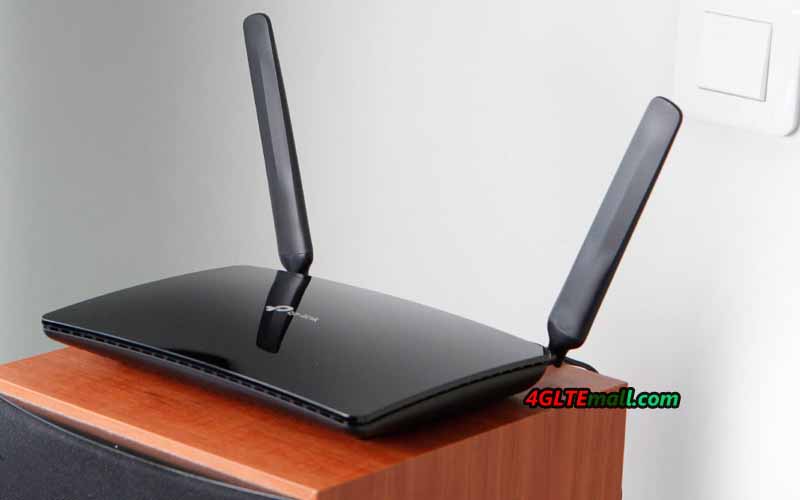
TP-Link Archer MR400 Specifications
Due to the configuration of the MIMO 3x3 antennas in the 2.4 GHz band and the MIMO 2x2 in the 5 GHz band, the Archer MR400 provides a total transfer rate of up to 1350 Mbps (450 Mbps in the 2.4 GHz network and 867 Mbps in the 5 GHz). For comparison: the predecessor Archer MR200 model is limited to a speed of 300 Mbit/s in the 2.4 GHz network and 433 Mbps in the 5 GHz network.
A high-performance WiFi module supports up to 64 users. It is recommended to connect to the 2.4 GHz network equipment that does not need high speed, as well as obsolete devices that do not support the 802.11ac protocol. At the same time, it's best to connect the demanding bandwidth to the 5 GHz network: televisions, game consoles, wireless storage devices, etc. Using the innovative MU-MIMO technology allows us to unleash the full potential of the WiFi 802.11ac standard and provide the maximum data transfer rate with simultaneous connection to a network of several clients.
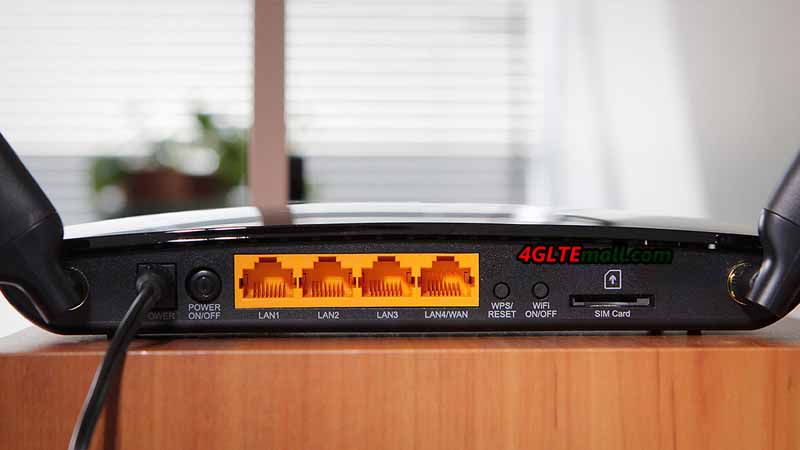
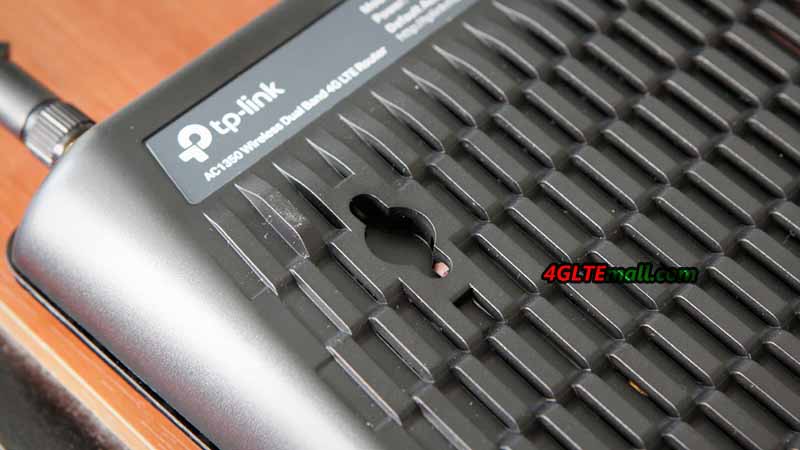
Archer MR400 is made in a stylish black case and supports the wall mount. A WPS button is also available on the back of the LTE router for quick connection of WiFi devices.
The TP-link router is equipped with one SIM card slot and supports all common cellular standards in Europe, including FDD-LTE in the frequency ranges of 800, 1800 and 2600 MHz, TDD-LTE in the 2600 MHz band and 3G at 900 and 2100 MHz. The maximum speed in 4G networks is 150 Mbit/s for reception and 50 Mbit/s for transmission (LTE Cat. 4). The MR400 Router also supports 2G-Internet and other broadband Internet standards used in different countries of the world.
To receive a mobile signal, the kit includes two small detachable LTE antennas with a small gain. In the case of a weak or uncertain input signal, more powerful directional antennas (sold separately) can be connected through the SMA connectors to the MR400.
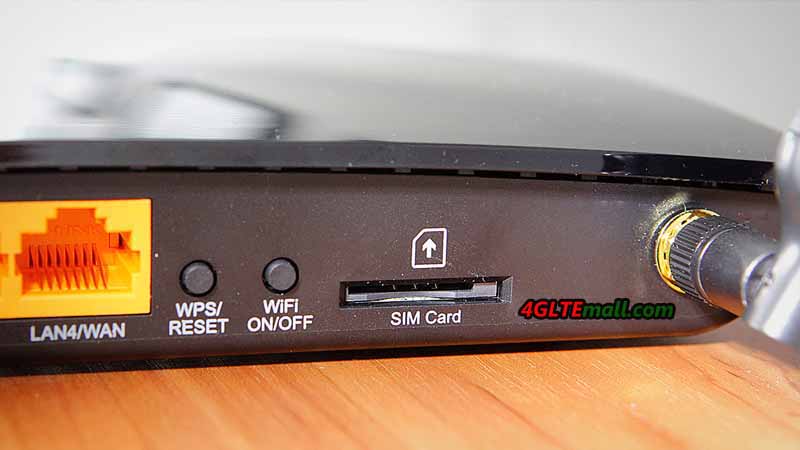
TP-Link Archer MR400 Interfaces
With the router, the adapters of changing Micro to Standard or NANO to Standard are included, which allow installing a SIM card of any format into the router. In addition to the SIM card slot, there are 4 Ethernet ports (10/100 Mbps) on the rear panel: 3 LAN ports and one switchable WAN / LAN port. Thus, the router can be connected to the Internet not only through a mobile connection but also through a normal cable from the provider. The drawbacks of the model include the absence of gigabit ports, which reduces the maximum speed of data exchange between wired and wireless devices in the network.
TP-Link Archer MR400 Settings
The configuration of the router is carried out via the web interface or the proprietary TP-Link Tether application. At the disposal of users, there are various settings of mobile connection and local network. The Archer MR400 administration panel contains all the parameters familiar to home routers, as well as some additional functions: two guest networks (2.4 and 5 GHz), parental control, QoS (bandwidth control), dynamic DNS (DynDNS, NO-IP), VPN (PPTP, L2TP, IPSec), NAT, IPv6, DHCP, protection against DoS attacks, filtering over IP and MAC addresses, etc.
The router is very easy to manage and does not require special skills for customization. In most cases, it is enough to install a working SIM card in the router and connect it to the power network: the mobile Internet and the WiFi network will work by themselves. With the Archer MR400, you can connect a large number of wireless devices to the 3G/ 4G Internet and ensure the maximum speed of data exchange in the WiFi network.
General Review of Archer MR400 Specifications:
With the development of LTE wireless technologies, more and more networks are evolving from LTE advanced to LTE advanced Pro. LTE Advanced Pro (LTE-A Pro, also known as 4.5G, 4.5G Pro, 4.9G, Pre-5G, 5G Project, and so on) is a marker of the 3GPP release 13 and 14, which is a natural evolution of Long Term Evolution (LTE) with speed up to Gbit/s level, which incorporated numerous new technologies that would be used in 5G standard, including 256QAM, Massive MIMO, LTE-Unlicensed, LTE IoT, and others to progressively evolve existing networks into 5G standard.
LTE-A Pro aims to significantly increase the data speeds and bandwidth available for mobile communications. It will also bring a much wider range of connected devices and platforms under a single standard. LTE-A Pro seeks to improve and optimize the capacity, performance, functionality and efficiency of LTE-A, as well as to further reduce latency, to provide a better user experience. It will also enhance the LTE platform for the delivery of new services to new markets as we move towards IoT with 5G. The key attributes that will define LTE-Advanced Pro are: > Data speeds in excess of 3Gbps (LTE-A: 1Gbps) > 640MHz of carrier bandwidth (LTE-A: 100MHz) > Latency: 2ms (LTE-A: 10ms) Since very few LTE Advanced pro devices are available in the market, the LTE vendors are already presenting their LTE advanced Pro modules to the public and below the five LTE advanced Pro modules are recommended if your terminals are demanding high-speed internet access:
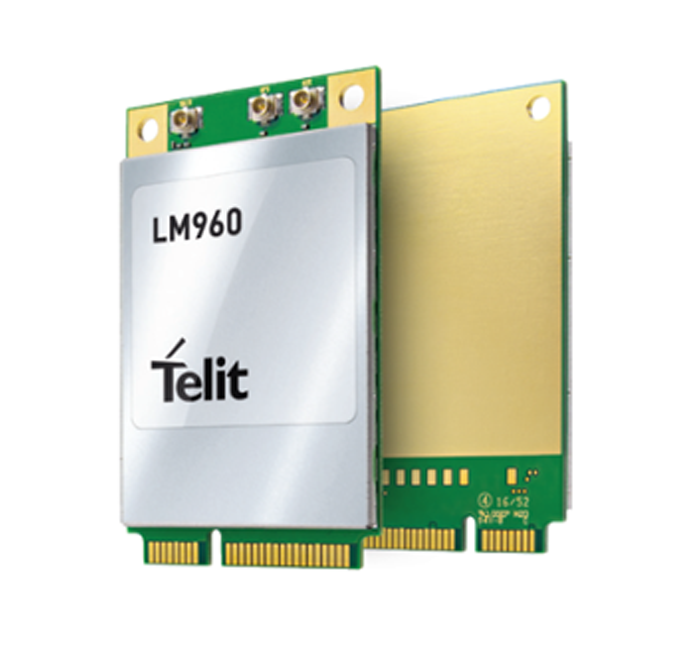 Specs Highlights: * World's first mPCIe form factor to support LTE cat.18 * Support global 23 LTE Frequency bands * LTE peak download speed up to 1Gbps * Dual SIM Single Standby * Full GNSS support: GPS, GLONASS, Galileo, Beidou * Chipset: Qualcomm Snapdragon X20 modem * Linux and Windows driver support * 4 x 4 MIMO and 256 QAM * 5x Carrier Aggregation for increased data rates Check more details about Telit LM960 Specs, price, drivers, and buy Telit LM960 module here: https://www.4gltemall.com/telit-lm960-4g-lte-cat18-pcie-module.html
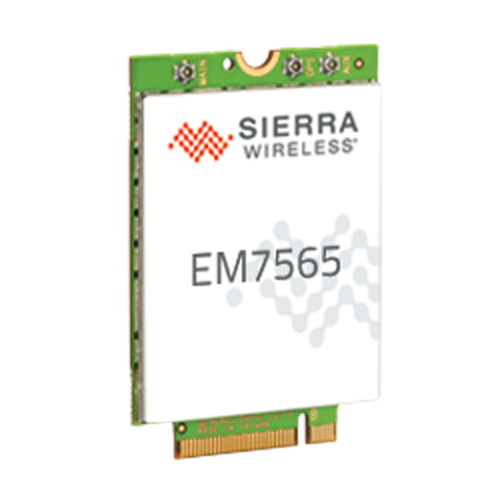 Specs Highlights: * LTE Advanced Pro Cat.12 Module * Chipset/Processor: Qualcomm MDM9250 * DL to 600Mbps/UL to 150Mbps * Supporting 24 worldwide LTE bands, including LTE-LAA and CBRS * Satellite Systems: Galileo, Glonass, GPS, Beidou * Planned Carrier AT&T, DoCoMo, Telstra, Verizon, Vodafone * Regulatory: CE, FCC, GCF, IC, NCC, PTCRB Check more details about Sierra AirPrime EM7565 Specs, price, drivers, and buy AirPrime EM7565 module here: https://www.4gltemall.com/sierra-wireless-airprime-em7565.html
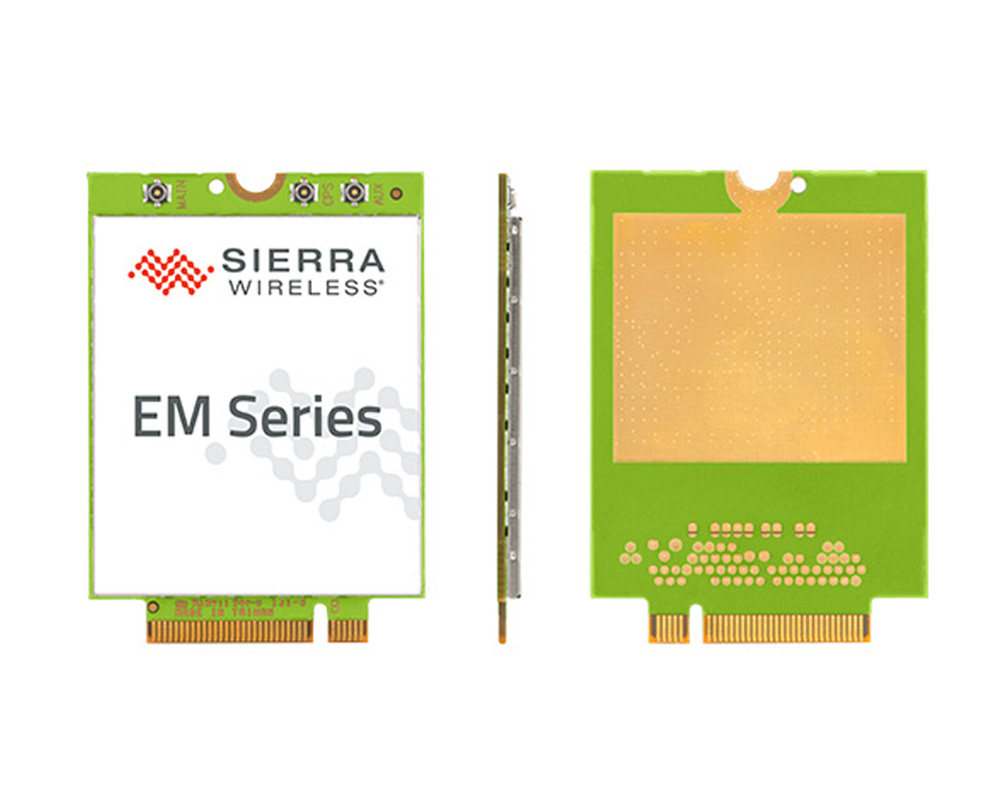 Specs Highlights: * Very similar to AirPrime EM7565 * LTE Advanced Pro Cat.12 Module * Form factor: M.2 * Chipset/Platform: Qualcomm * DL to 600Mbps/UL to 150Mbps * Supporting 24 worldwide LTE bands, including LTE-LAA and CBRS * Control Options: APIs, AT Commands * Firmware over-the-air (FOTA) * GPS, GLONASS, BeiDou, and Galileo satellite systems supported Check more details about Sierra AirPrime EM7511 Specs, price, drivers, and buy AirPrime EM7511 module here: https://www.4gltemall.com/sierra-wireless-airprime-em7511.html
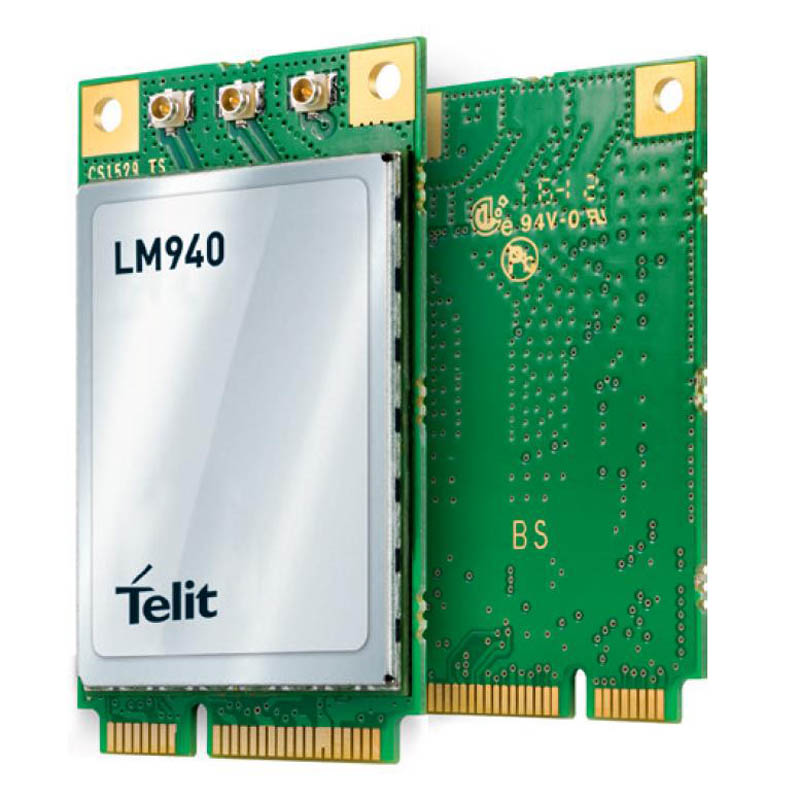 Specs Highlights: * Category: LTE Cat.11 Module * Form Factor: PCI Express Mini Card Type (mPCIe) * Chipset: Qualcomm MDM9240 * LTE data rates: DL 600Mbps(w/3x CA DL, 256QAM) and UL 75Mbps * Full GNSS support: GPS, GLONASS, Galileo, Beidou * Carrier Approvals: AT&T, Sprint, Verizon Check more details about Telit LM940 Specs, price, drivers, and buy Telit LM940 module here: https://www.4gltemall.com/telit-lm940-lte-cat-11-gps-pcie-module.html
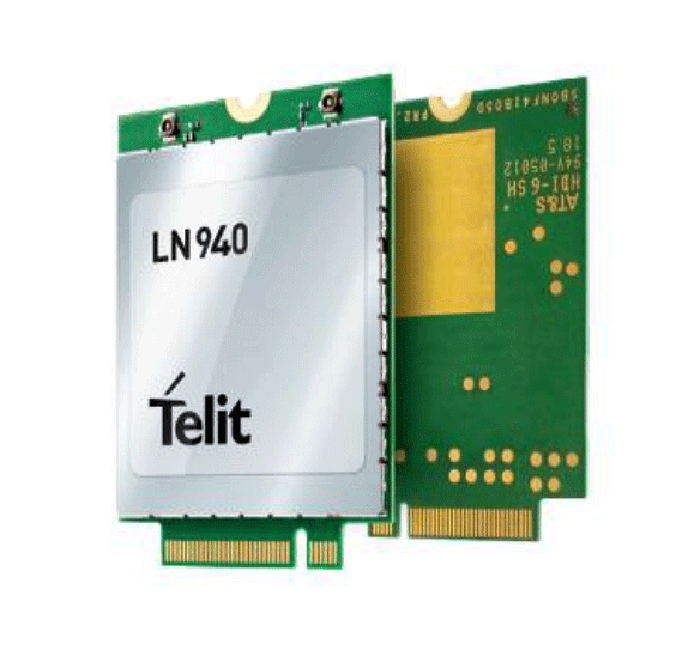 Specs Highlights: * Two variant models: Telit LN940A9 and LN940A11 * 42mm M.2 (NGFF) single-sided data card * LTE Category 11 LTE DL 600Mbps UL50Mbps * LTE Category 9 LTE DL 450Mbps UL50Mbps * HSPA+ Rel. 8: DL/UL up to 42/11.5 Mbps * Quad-constellation integrated GNSS * Linux and Windows driver support * Carrier Aggregation, 2 x 2 MIMO and 256 QAM Check more details about Telit LN940 Specs, price, drivers, and buy Telit LN940 module here: https://www.4gltemall.com/telit-ln940-lte-cat9-11-m-2-data-card.html
In past years, 4G mobile routers with SIM card slot are becoming more and more well-known because they are of small size and can be easily taken in a handbag or in a pocket. Nowadays, more and more people would prefer the 4G router with Ethernet port, which would provide one more option for internet connection. What’s the more, the manufacturers usually configure the 4G routers with Ethernet with large battery pack, which makes the 4G pocket router work like a power bank to charge other devices. Huawei was the first manufacturer to release its 4G mobile router with Ethernet port, and now the Netgear follows. Huawei E5885 is the latest 4G mobile hotspot with Ethernet and Netgear present the Nighthawk M1 as its first 4G router with Ethernet. Someone may ask: what’s the difference between Huawei E5885 and Nighthawk M1? Which one is better? You may find the answers after reading this article.
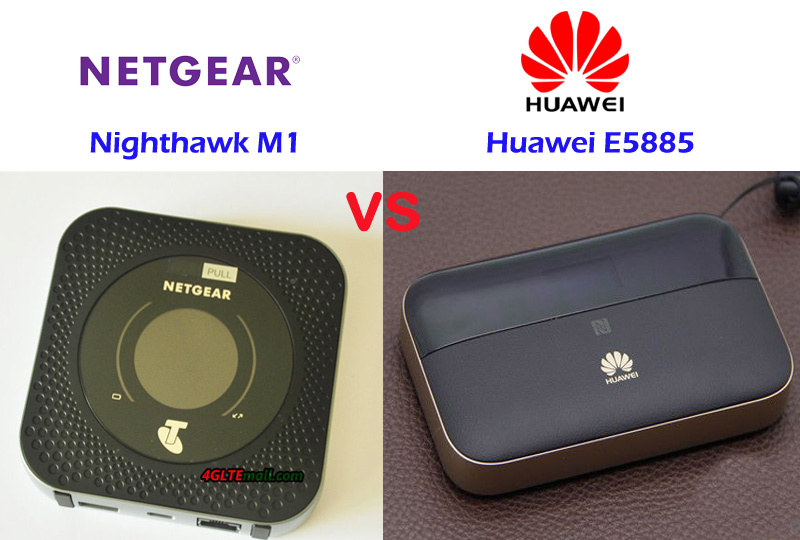
Huawei E5885 VS Nighthawk M1 Appearance and Interface
Actually, before the Huawei E5885 was presented, Huawei had released a few mobile hotspots with Ethernet port such as E5151, E5730, E5351, E5770, E5771, which are a series mobile router with Ethernet. It has been proved this series of MiFi hotspots are very popular in the end-users. Now the upgraded Huawei E5885 is available with more advanced features and cool design. On the front of E5885, the upper part is LED screen while the lower part is leather material with Huawei logo. The touch feels in hand is very much better than the predecessor models. And it’s much thicker than the mobile hotspot E5770 and E5771. The power button, WPS, and the Interfaces are located at the top edge side of the body. The Ethernet port and USB ports are covered by a square cap, which you have to open it to see. The back cover could be removed, however, like the Huawei E5786, the battery is built-in and non-changeable. The Mirco SIM card slot and SD storage card slot are available with the reset button.
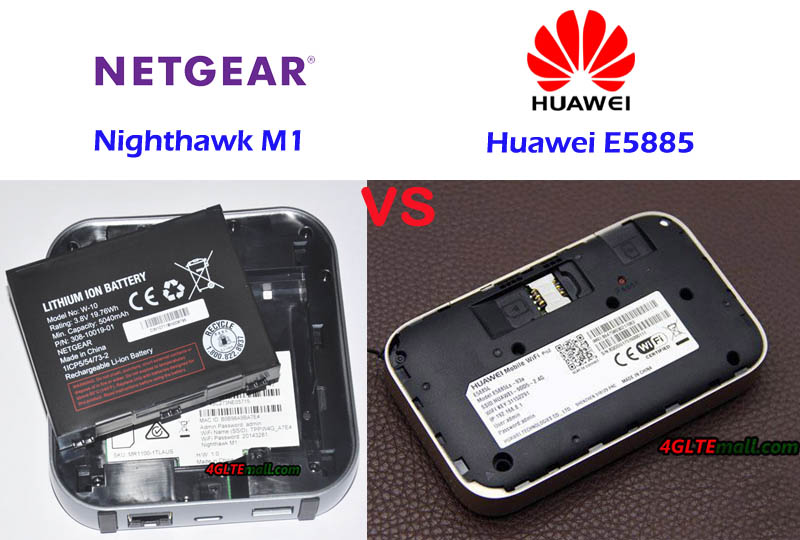
Unlike its predecessor of Netgear mobile router, Nighthawk M1 also has a thick body. On the front, there is a round screen, like E5885, it’s also not a touchscreen. There are battery and data transmission indicators around the screen. The Netgear logo and carrier logo are on the side of the screen. The power button is on the top side and the Ethernet & USB ports are located on the opposite side. The difference is Netgear Nighthawk M1 has two connectors for external antenna, which is missing in Huawei E5885. And the USB input ports for Nighthawk M1 and the Huawei E5885 are different. The Nighthawk M1 back cover could be removed and unlike Huawei E5885, the battery could also be removed for exchange. The Netgear M1 also use Micro SIM card size, but no slot for SD card.
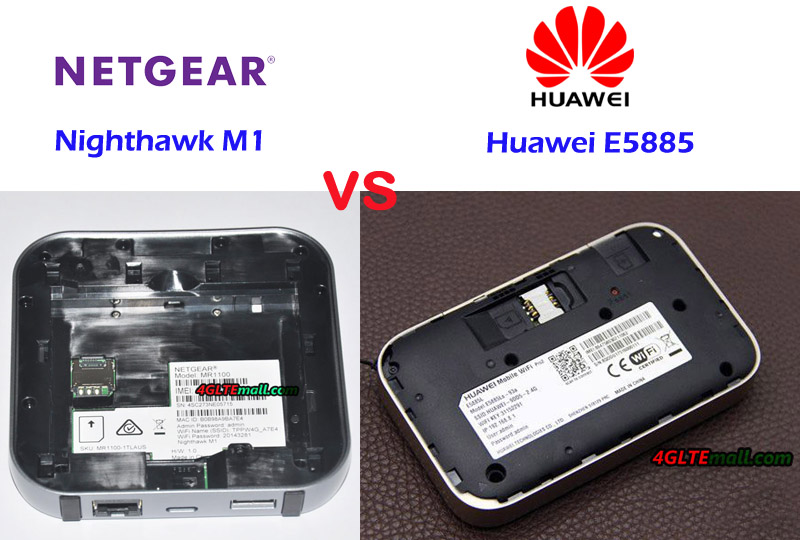
Netgear Nighthawk M1 VS Huawei E5885 Specs and Variant models
Since the network frequency bands are different in different countries or areas, the Nighthawk M1 has around three variant models: Telstra Nighthawk M1, AT&T Nighthawk M1, and another variant model for Europe market. The Huawei E5885 has only one variant model: Huawei E5885Ls-93a. It seems to be a global version, however, in China, the Huawei E5885LS-93a in China has only one language (Chinese) available. In other countries such as Saudi Arabia or Romania, we found they have many languages available, at least with the English language. From the appearance, we can see the Nighthawk M1 and Huawei E5885 are very different in the design. To know more difference, let’s have a look at the detail specs of the Nighthawk M1 and E5885:
| Model | Netgear Nighthawk M1 | Huawei E5885 |
| Product type | LTE Mobile Hotspot | LTE Mobile Hotspot |
| Category | LTE Cat.16 | LTE Cat.6 |
| Chipset | Qualcomm MDM9x50 | Hisilicon LTE Cat6 chipset |
| Data rates | DL 1Gbps/UL 100Mbps | DL 300Mbps/UL 50Mbps |
| Supported 4G LTE frequency bands | -- Telstra Nighthawk: Band 1/3/7/8/28 -- AT&T Nighthawk: Band 1/2/3/4/5/7/12/29/30/66 | Huawei E5885Ls-93a: Band 1/2/3/4/5/7/8/19/20/28 * TDD-LTE: Band 38/40/41/42 |
| WLAN | 802.11a/b/g/n/ac, dual-band 2.4GHz & 5GHz | 802.11a/b/g/n/ac, dual-band 2.4GHz & 5GHz |
| Max support users | 20 users | 32 users |
| MIMO | 4 X 4 MIMO | 2 X 2 MIMO |
| Connector for external antenna | Two, TS-9 jacks | No connector |
| Buy Antenna | Netgear Nighthawk M1 Antenna | N/A |
| App management | Netgear Aircard APP | Huawei Hilink APP 3.0 |
| SIM type | Micro SIM | Micro SIM |
| Battery | Removable, 5040 mAh | Non-removable, 6400mAh |
| Dimensions | 105.5 x 105.5 x 20.35 mm | 112.00 x 69.20 x 23.00mm |
| Ethernet Port | One Ethernet Port for LAN | On port for WAN/LAN port(RJ-45) |
| Datasheet download | AT&T Nighthawk M1 Datasheet | Huawei E5885 Datasheet |
| User Manual | AT&T Nighthawk M1 Manual | Huawei E5885 Manual |
| Other features | 4 band CA, JumpBoost | Power bank, CA, NFC |
| Reviews | Netgear Nighthawk M1 AT&T Review | Huawei E5885 Review |
| Price | 459.00USD | 249.00USD |
Summary
From the specs, we can see the Nighthawk M1 Router is more advanced with the support of LTE Cat.16, which could achieve downloads speeds up to 1Gigabit/s and upload speed to 100Mbps. The speed is much faster than that of Huawei E5885. The LTE Advanced Pro technologies would provide amazing surfing experience. The Nighthawk M1 variant models could be used globally after unlocking. However, there is maybe limitation due to network incompatibility. The Huawei E5885LS-93a seems to be more open for global travel. It covers the main frequency bands in all the areas.
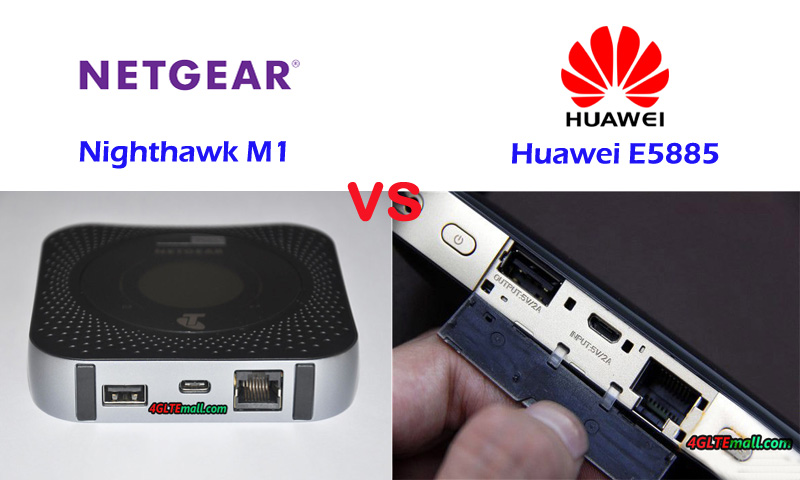
The Nighthawk M1 could support maximum users up to 20 while Huawei E5885 mobile hotspot supports up to 32 users. The Ethernet port in Huawei E5885 is for WAN and LAN but the port in Netgear M1 is only for LAN, which may not be as good as expected for the Ethernet. The Huawei E5885 has a large battery capacity of 6400mAh while Netgear MR100 has around 5040 mAh battery; however, the removable battery of Nighthawk M1 seems better than Huawei E5885 built-in battery. The missing of antenna connector in Huawei E5885 is also criticized while the Netgear M1 has two connectors for external 4G antenna, which is very useful if using the device in weak signal areas. Per the feedback from the users of Nighthawk M1, it’s the best 4G router with Ethernet. However, the advanced Nighthawk M1 price is more expensive, so if you would buy Nighthawk M1, the price is an important concern.
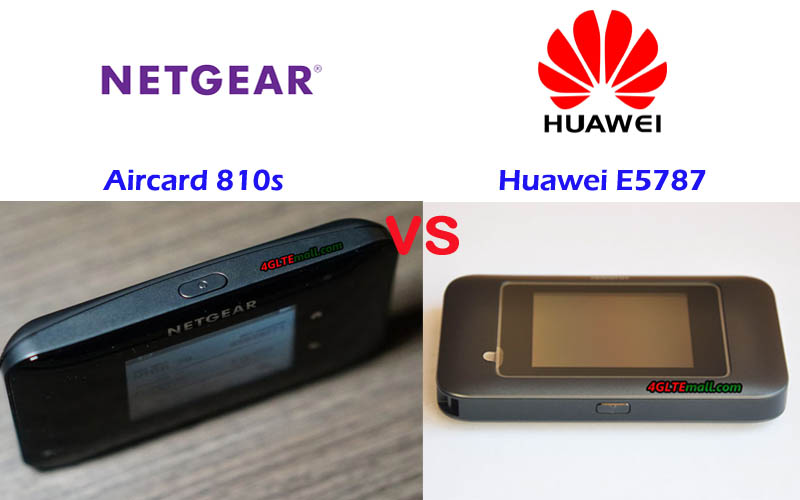
Netgear 4G mobile routers are very well-known worldwide due to the stable performance and practical functions, and it’s always leading the development direction of the 4G LTE mobile broadband. If you know the Netgear Aircard 790s, you may know it’s the world’s first LTE mobile hotspot with a touchscreen. Now the upgraded model Aircard 810s becomes the best seller for LTE-A networks. As the aggressive competitor, Huawei follows the steps of Netgear. Huawei released its first LTE mobile router with a touchscreen: Huawei E5787 (also named Huawei Mobile WiFi Touch). And now the market proves the Huawei E5787 also becomes the best seller of Huawei LTE hotspot with a touchscreen. Someone may ask: What’s the difference between Huawei E5787 and Netgear Aircard 810s? Which one is better? You will find one answer in this article.
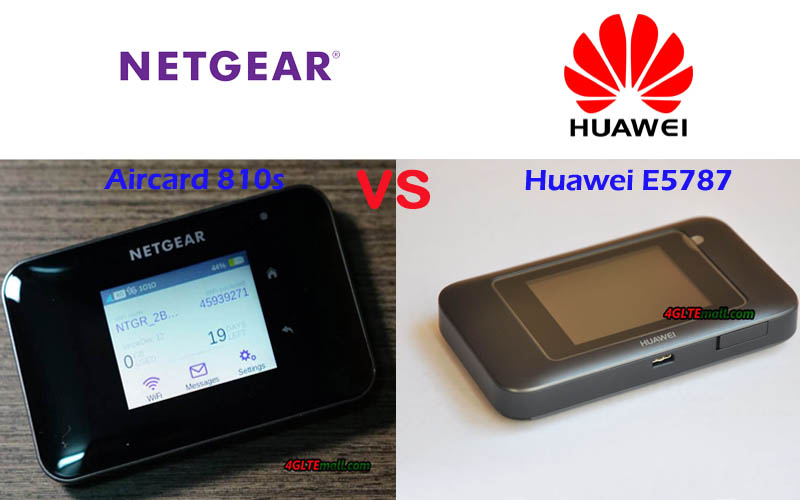
Huawei E5787 VS Netgear Aircard 810s Appearance and Interface
The Huawei E5787 and Netgear Aircard 810s both have a touchscreen in the middle of the front. Netgear aircard 810 has a Home button and Back button at the side of the screen. However, the Huawei E5787 doesn’t have the button. Only Huawei logo is below the screen. They have the same features on the appearance: the power button is at the top edge side of the router, on the opposite side, two TS-9 connectors for external antennas are available, and they both have USB 3.0 interface. The difference is the Huawei E5787 antenna connectors located together while the Aircard 810s antenna connectors are located separately, the USB 3.0 interface is in the middle of the two connectors.
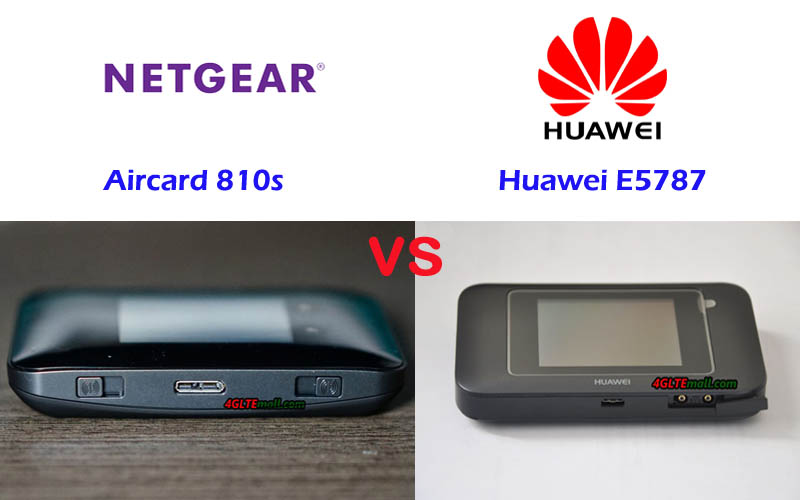
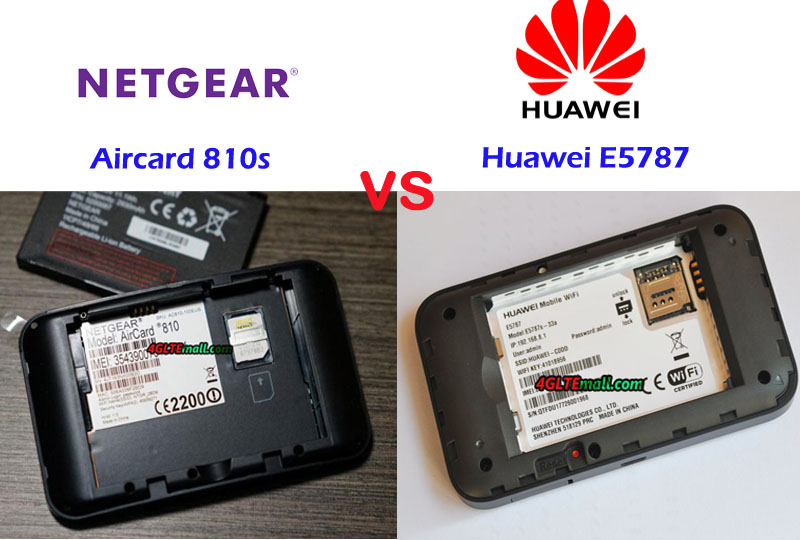
The battery of Netgear AC810s and Huawei E5787 could be removed for exchange, and they both use Micro SIM card. However, they both don’t have the slot for Micro SD storage card. Huawei E5787 has a special design: one corner of the body has a port to tie a rope so that you can hold the rope to keep the Huawei E5787 device.
Netgear AC810S VS Huawei E5787 Specs and Variant models
From the appearance and interfaces, we can see the design of the Huawei E5787 and Aircard 810s is very similar, especially when they are both in black color. The Huawei E5787 has other colors available in the market, such as Glod, White, Brown etc… Like other Huawei 4G Mobile WiFi Hotspots, Huawei E5787 also has many variant models: Huawei E5787s-33a, Huawei E5787Ph-67a, and Huawei E5787Ph-92a. Similarly, the Aircard 810s has two variant models: one for Telstra and the other for Europe. Then let’s review the Huawei E5787 specs and Aircard 810s specs for more comparison:
| Model | Huawei E5787 | Netgear Aircard 810s |
| Product type | LTE Mobile Hotspot | LTE Mobile Hotspot |
| Category | LTE Cat.6 | LTE Cat.11 |
| Chipset | HiSilicon LTE Cat6 Chipset | Qualcomm Snapdragon X12 |
| Data rates | DL 1Gbps/UL 100Mbps | DL 600Mbps/UL 100Mbps |
| Supported 4G LTE frequency bands | * Huawei E5787s-33a: Band 1/3/5/7/8/20/38/40/41 * Huawei E5787Ph-67a: Band 1/3/5/7/8/20/38/40/41 | B1, B3, B7, B8, B28 |
| WLAN | 802.11a/b/g/n/ac, dual-band 2.4GHz & 5GHz | 802.11a/b/g/n/ac, dual-band 2.4GHz & 5GHz |
| Max support users | 10 users | 15 users |
| MIMO | 2 X 2 MIMO | 2 x 2 MIMO |
| Connector for external antenna | Two, TS-9 jacks | Two, TS-9 jacks |
| Buy Antenna | Huawei E5787 external Antenna | Aircard 810s External Antenna |
| App management | Huawei Hilink APP | Netgear Aircard APP |
| SIM type | Micro SIM | Micro SIM |
| Battery | 3000mAh | 2930 mAh |
| Dimensions | 109.00 x 58.00 x 7.50mm | 112 x 68.6 x 15.45mm |
| Ethernet Port | No | No |
| Datasheet download | Huawei E5787 Datasheet | Netgear AC810S Datasheet |
| User Manual | Huawei E5787 Manual | Telstra 4GX Adavanced III Manual |
| Other features | 2 band CA | 3 band CA |
| Reviews | Huawei E5787 Review | Netgear Aircard 810s review |
| Price | 299.00USD | 229.00USD |
Summary
From the specs, we can see the Aircard 810s is more advanced than the Huawei E5787, because the Netgear 810S could support maximum downloads speed up to 600mbps while the E5787 support peak downlink speed to 300Mbps. The Aircard 810s can achieve twice faster speed than that of E5787. It’s probably because of the Qualcomm chipset with more advanced technologies. And Netgear Aircard 810s supports more WiFi users to 15 while Huawei E5787 4G+ supports only 10 users. However, the Huawei E5787 has more variant models, which means the sub-models could work well with more LTE network providers. The unlocked version would travel globally freely.
The amazing thing is that the more advanced mobile hotspot Netgear Aircard 810s has a better price than that of Huawei E5787. With more powerful function and better price, if you would buy a 4G pocket WiFi router for global use, the Aircard 810s would be the better option than Huawei E5787.